
Contact us to discuss Boundary Scan Tools and Services
If you have questions, or would like information on our Boundary SCAN products, please feel free to contact us on: 1-800-928-6038 or click the button to send us a note.
JTAG Boundary Scan Test Products
Etoolsmiths provides complete JTAG Boundary Scan test systems from XJTAG backed by expert support, training and test consulting services for commercial and ITAR/EAR projects.
Our software and hardware tools allow test and development engineers to debug, test and program printed circuit boards.
The XJTAG system delivers maximum test coverage by allowing you to test all IEEE 1149.X boundary-scan compliant devices as well as non-boundary scan devices.
To learn more about our products please review the sections below:
XJDeveloper - Test Development GUI/Boundary Scan Software
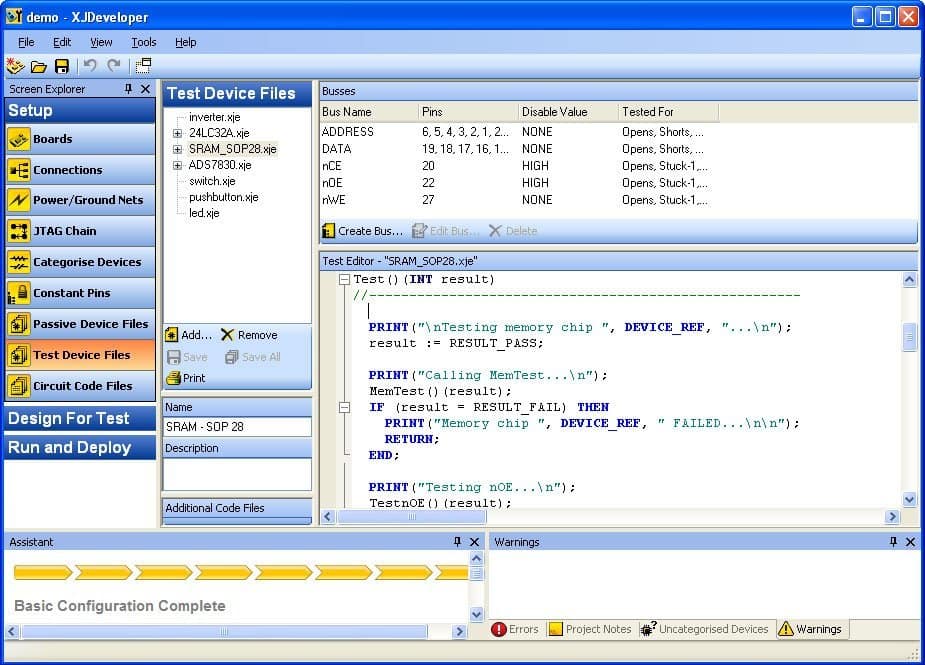
XJDeveloper is a graphical software application that allows you to quickly and easily set up and run tests on your circuit. With XJDeveloper you can reduce your time to market by reusing your test scripts all the way through the product design process and then in manufacturing.
Use standard files to begin the board set up process
To get started you simply need to provide a netlist, Bill of Materials (BOM) and Boundary Scan Definition Language File (BSDL) files for the devices in your JTAG chain to the tool. The tool consumes these files and presents you with an intuitive wizard allowing you to tell the system about your circuit board.
Automatically generate an interconnect test
Once you complete the categorization process, the tool will automatically generate a "connection test" that can detect opens, short and stuck-at faults for all reachable nets in your design.
Use built in library files to test non-jtag devices
Finally using standard device test models from our built-in library and by creating your own tests you can functionally and electrically test accessible non-jtag devices on your circuit board. All device files include full source code with no "black Box" hidden components so you can fully understand and modify files as needed.
Run the Tests on your hardware to detect faults
After you complete the set up process you can quickly detect failures on your printed circuit board hardware and use powerful tools to further debug issues and find the root cause of faults found using our XJRunner and XJAnalyser tools.
Generate a Complete Test Coverage Report for Your Hardware
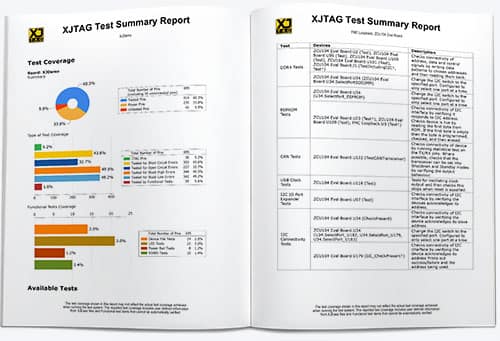
A full test coverage report can be generated allowing you to see exactly which nets, pins and devices have coverage and how complete that coverage is. Reports include tables and graphs showing opens, shorts, stuck at and functional coverage. Descriptions are provided for non-JTAG devices tests from our library.

XJRunner - Runtime Test GUI
XJRunner - Runtime Test GUI
XJRunner is the specialised run-time environment for executing pre-compiled XJDeveloper projects. With a range of special features it is particularly aimed at board manufacturers and in-field support.
In one package, you have interconnect testing, in-system programming, non-JTAG device testing, serial number handling and configurable log files for your audit trail.
XJRunner provides full error diagnosts down to the pin and net level allowing you to quickly and easily detect and rectify faults.
XJAnalyser - Board Debug GUI
XJAnalyser - Board Debug GUI
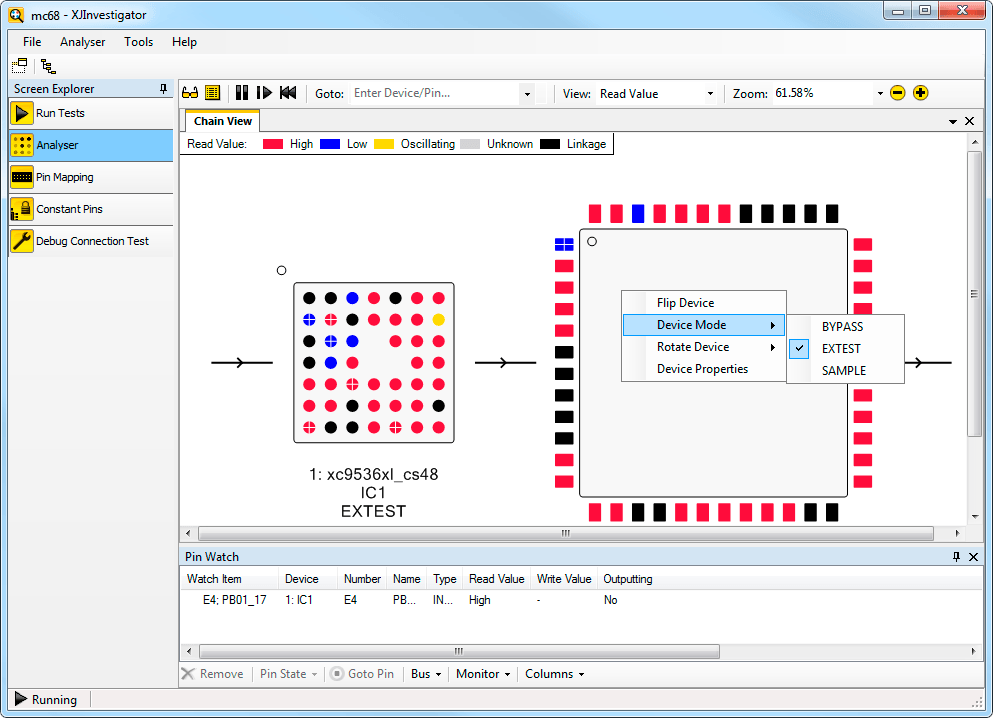
XJAnalyser allows you to diagnose manufacturing problems on failing boards. Combining the test capabilities of XJRunner and XJAnalyser with additional diagnostic functionality, XJInvestigator is the boundary scan tool to use at your repair/rework station. XJAnalyser GUI allows you to peek and poke pins to view and change their state. Need to set a pin to enable a PMIC or FPGA with XJAnalyser its as simple as a click.
XJInvestagator - Production Debug Station
XJInvestigator is the perfect tool for engineers and technicians doing detaied circuit board debug and repair. It provides all the tools needed to runn testes and diagnose failures down to the root cause. XJInvestigator provides a repair, test and debug environment that leverages XJRunner, XJAnalyser and aditional debug tools into one powerful tool.
XJEASE – JTAG Test Implementation Language
XJEase is powerful, high-level, block structured test description language that lets you create reusable tests for virtually any type of hardware device.
Much more than a simple macro language, XJEase was designed from the ground up to help you implement chip, board and systems level JTAG tests in a snap.
The key to successful board test is coverage. XJEase provides unsurpassed test coverage with our built-in advanced connection test. The connection test provides detailed fault information making it easy to get to the root of a problem.
Testing Non-JTAG devices (so-called cluster devices) has never been easier. Many popular devices are already supported in our extensive device library.
Best of all, XJEase test files (provided in full source form) drop right in and let you start testing your devices with virtually no programming at all. Here are just a few of the devices that we support:
- Ethernet MAC/PHY
- Graphics and Video
- SPI and QSPI devices
- IIc based devices
- RAM Memory, such as DDR and Static RAM
- FLASH devices (Both NAND and NOR FLASH devices)
- PMICs
XJEase is also perfect for testing JTAG-enabled devices such as: PowerPC, Mips, ARM, Micro-controllers, and processors well as programmable logic-based devices like FPGAs and CPLDs.
View the XJDeveloper/XJEase Data Sheet>>
Test Execution Hardware

We provide several hardware interfaces for communicating with your test system: USB-Based and PXI-Based JTAG Controllers, and Digital/Analog I/O modules.
The popular USB-Based XJLink2 is small and portable–yet incredibly fast. Taking maximum advantage of USB 2.0 we achieve speeds of up to (480Mbps) to the JTAG chain. The compact size makes this system ideal for field as well as LAB work. View the USB Based JTAG Data Sheet>>
 For up to 8 TAPS and Harsh Electrical Environments, we provide the PF-40 system (UP to 8 JTAG port support and 40 I/Os). These modules are an excellent choice with designs with a high TAP count and additional I/O port requirements. PF-40 Data Sheet
For PXI Rack Based Test Environments, we provide two PXI modules (single and duel JTAG port support). These PXI modules can be added to your test system and fully integrated into many popular environments like LabVIEW™ to communicate with your device under test. View the PXI XJLInk2
To get around the annoying licensing issues found with other systems, all our hardware interfaces include a product key in the hardware so you can run the software on as many systems as you like.
To test analog and digital test points that are not accessible by JTAG, we provide our XJIO module. The XJIO board comes in two flavors: stand-alone and PXI-Based.
Simply add the XJIO to the existing JTAG chain and you are ready to test power supply and other analog voltages, as well as digital I/Os on you target boards. View the XJIO Data Sheet>>
Production Test GUI Interfaces and APIs
Once you have your tests created, you need an interface to allow users to run those tests. XJRunner, is a simple to use GUI interface for running your XJEase programs. Simply select the tests that you would like to run and add them to the GUI.
For integration with LabVIEW™, LabWindows™/CVI based environments we supply a complete Component Object Model (COM) interface implementation.
The Component Object Model (COM) API interface can also be used to create your own C/C++, VB or C# based applications to control XJTAG based tests.
Finally, for accessing JTAG Boundary Scan at the state-machine level, we provide our low-level JTAG API. The low-level API is perfect for IC level testing by device manufacturers. You can use the standard API if appropriate, or we can customize the API to your unique needs.
View the Low-Level JTAG API Data Sheet>>
JTAG Boundary Scan Test Services and Consulting
Too busy to write tests yourself, but would like to take advantage of Boundary Scan?
If so, you may want to consider our test services. We can provide a fixed price quote and complete the work on time and in budget.
Need to adhere to ITAR/EAR rules? We are ITAR registered and have US based engineers to complete ITAR work.
For more information or to get a quote, please contact us today .
XJTAG Training and Support
To help you become productive as quickly as possible we provide ready-to-run tutorials and quality documentation–all backed by responsive technical support. To help you quickly learn about our tools we also provide: Training Classes, Webinars and resources.
When it’s time to move to your hardware, we provide our unique JTAG Chain Debugger to help you find and rectify connection problems fast.
Free Board Tests with Your Evaluation
If you need to get working tests quickly, we can do your board set up and tests for you during the evaluation process.
Tests done by our team saves you valuable time, and since all tests are provide in full source form, they constitute a perfect set of examples when you begin to write your own tests.